🚀 Blogger Blog Ko Google Search Console Me Kaise Add Kare: Step-by-Step Complete Guide (2026)
A comprehensive 1500+ word masterclass detailing how to set up a free Blogger blog, add and verify properties in Google Search Console, submit your XML sitemap correctly, resolve common fetch errors, and rank your content on Google.
Introduction: The Essential Link Between Blogger and Google Search Console
Creating a new blog on the Blogger platform is an exciting first step for digital creators and aspiring webmasters. However, simply publishing articles is not enough to gain organic traffic. Your web pages need to be crawled, indexed, and ranked by search engines so that target readers can find your content.
To bridge this gap, webmasters rely on Google Search Console (GSC). By registering your website domain and submitting a structured sitemap, you grant search engine bots a clear roadmap of your database. This ensures faster indexing and real-time performance tracking.
This ultimate guide walks you through every technical phase, from initializing your free .blogspot profile to configuring URL prefixes, bypassing sitemap fetch errors, and leveraging technical best practices for long-term SEO success.
📌 Essential Phase 1: Launching Your Free Blogger Blog Correctly
Before configuring technical indexing tools, you must establish your primary blog parameters on Google’s native publishing network. Follow these foundational steps to build a solid base:
1. 🌐 Navigating to Blogger.com and Initializing Your Dashboard
Open your preferred web browser and go directly to Blogger.com. Sign in using the specific Google account credentials tied to your intended web project. Click on the create blog option to start setting up your customized workspace.
2. 📝 Defining Your Blog Title and Unique URL Address
Input a descriptive title for your blog that reflects your niche, such as a recipe portal or poetry hub. Next, choose a clean, available web address suffix under the standard .blogspot.com extension. Complete the setup by specifying your preferred display name.
3. 🔍 Understanding the Core Purpose of Google Search Console
Google Search Console is a robust, free utility designed to monitor search presence. It delivers diagnostic data regarding organic keyword impressions, click-through rates, mobile usability warnings, and core indexing status across your entire website layout.
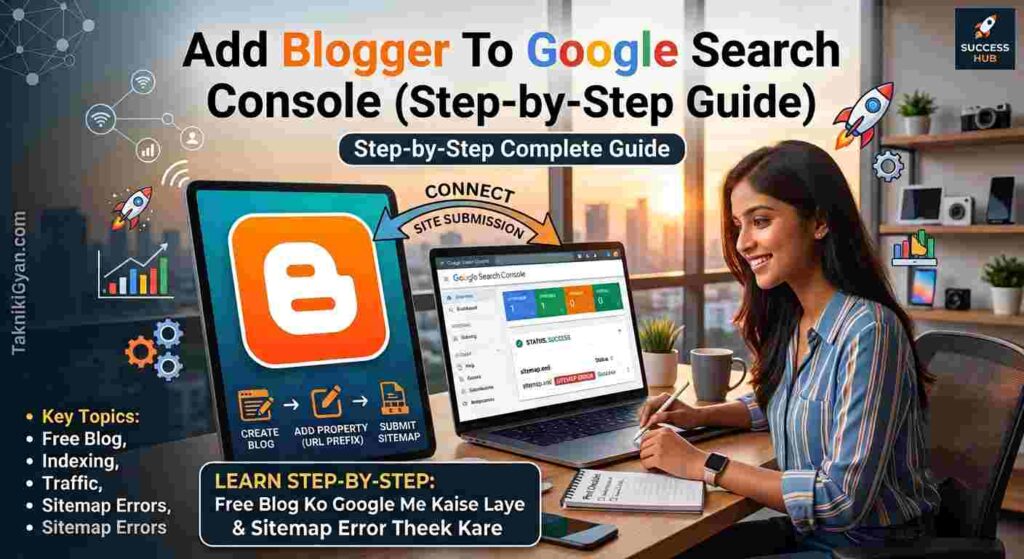
4. ➕ Adding Your Property via URL Prefix Protocol
Navigate to search.google.com/search-console using your administrator Gmail login. Click the top-left property menu dropdown and select ‘Add Property’. Choose the URL prefix option rather than the domain option, and paste your full blog URL (e.g., https://yourblogname.blogspot.com/) to achieve instant automated ownership verification.
5. 🗺️ Submitting Your XML Sitemap for Immediate Bot Discovery
Once your property dashboard opens, access the Indexing section on the left sidebar and click on Sitemaps. In the ‘Add a new sitemap’ text box, type sitemap.xml right after your domain prefix and hit the submit button to establish your site structure index.
6. ❌ Troubleshooting and Fixing Common Sitemap Errors (Could Not Fetch)
New blogs often trigger a red ‘1 error’ alert if submitted while completely empty. To resolve this, publish at least one original article, delete the broken sitemap entry using the three-dot menu, and resubmit sitemap.xml. Alternatively, use the atom feed parameter if fetching delays persist.
7. 📈 Analyzing Performance Metrics and Keyword Impressions
After successful indexing, monitor the Performance tab regularly. Review organic click-through rates, average search positions, and user queries to understand what content resonates with your audience and refine your future writing strategies accordingly.
8. 📱 Optimizing Mobile Usability and Core Web Vitals Performance
Google prioritizes mobile-friendly web experiences. Inspect the Experience reports in Search Console to ensure your Blogger theme loads quickly, adapts seamlessly to mobile screens, and avoids intrusive layout shifts during loading.
9. 💡 Professional Best Practices for New Bloggers
Always verify that HTTPS redirection is enabled in your Blogger settings panel. Avoid submitting blank blogs to search engines, maintain consistent posting schedules, and focus on high-intent keywords to accelerate your domain authority growth.
💡 Technical Pro Tip
“Never submit an unpopulated web property to Google Search Console. Ensuring that your domain hosts at least two or three robust, high-quality articles prior to sitemap registration eliminates fetch errors and invites search engine crawlers to index your content on the very first pass.”
❓ Frequently Asked Questions (FAQs)
Q1. 🌐 Can a free .blogspot domain rank successfully on Google search results?
Answer: Yes, absolutely. With proper on-page optimization, clean sitemap submission, and high-value content, free blogs rank efficiently.
Q2. 📊 How many properties can be managed under a single Search Console account?
Answer: You can manage multiple blog properties under one Google account by creating separate individual properties for each domain.
Q3. ⏱️ What is the average timeframe for a new post to show up on Google?
Answer: Indexing typically ranges from a few hours to a couple of days depending on crawl budget and authority growth.
Q4. 🛠️ Which configuration option should choose for a free Blogger link?
Answer: Always choose the URL prefix method because standard domain DNS records cannot be altered on free subdomains.
🎯 Final Summary & Community Engagement
Mastering the initial configuration workflow between Blogger and Google Search Console sets the groundwork for a successful publishing journey. By following structured steps, avoiding empty sitemap submissions, and utilizing prefix tracking, you position your articles for optimal search engine visibility.
🌐 Connect With Our Platforms:
Explore our official channels for more advanced technical tutorials, SEO guides, and web development resources:
- YouTube: Access comprehensive video demonstrations on technical web management.
- Instagram: Follow our profile for fast-paced digital optimization tips.
- Facebook: Engage with a community of enthusiastic creators and developers.
- Twitter (X): Get instant alerts on algorithm updates and publishing guidelines.
Thank you for reading TaknikiGyan.com! Share this article with fellow creators looking to scale their digital presence.