
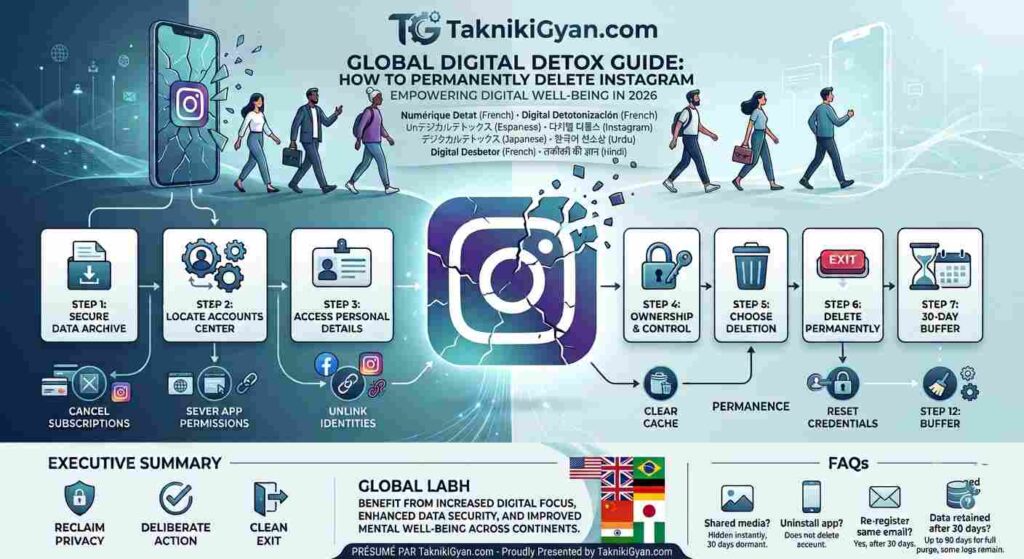
🛡️ Digital Detox Guide: How to Permanently Delete or Deactivate Instagram in 2026
Complete Master Guide 2026: Take back control of your digital focus, archive your personal footprint, and permanently terminate your Instagram presence across iOS, Android, and Web platforms with professional technical assistance by engineer Rameshwar Singh.
Introduction: Reclaiming Your Digital Privacy in 2026
In an era driven by algorithmic loops, continuous notifications, and endless social media scrolling, taking back control of your digital focus is a remarkably powerful move. Whether you are stepping back for mental clarity, protecting your personal data from trackers, or simply shifting away from Meta’s massive ecosystem, closing an Instagram account should be a seamless, absolute, and secure experience.
However, major technology platforms rarely make exit doors easy to spot. Navigating through complex privacy menus, hidden links, and centralized account centers can often feel intentionally confusing and frustrating. This comprehensive guide outlines the exact, step-by-step workflow to archive your entire digital footprint, unlink active subscriptions, and permanently terminate your Instagram profile across iOS, Android, and Web platforms without losing important data.
📌 Step-by-Step Instagram Deletion Workflow (20 Steps)
चूँकि हर एक तकनीकी चरण का सही पालन करना आवश्यक है, इसलिए इन सभी 20 स्टेप्स को नीचे विस्तार से समझें:
1. 📂 Secure Your Archive (Download Data First)
Before terminating your account permanently, it is critical to request an encrypted digital archive of your profile. Navigate to Your Activity > Download Your Information. Meta will generate a downloadable ZIP file containing your high-resolution photos, chat histories, active connections, and historical metadata.
Technical Tip: Always verify that your download link is fully compiled and saved on your local hard drive at least 48 hours before submitting the final account deletion command to avoid data loss.
2. 🔐 Locate Meta’s Unified Accounts Center
Meta manages settings through a centralized portal across all its interconnected apps. Open your Instagram profile, tap the top-right menu consisting of three horizontal lines, and enter Settings and Privacy. At the very top of the menu, select Accounts Center.
Infrastructure Note: The Accounts Center acts as the primary control hub for all linked Instagram, Facebook, and Threads profiles, meaning changes here can affect cross-platform credentials.
3. 👤 Access Personal Details Protocol
Scroll down to locate the Account Settings cluster within the Accounts Center interface, and then select Personal Details. This specialized section governs your official identity confirmation, primary contact information, date of birth, and legal ownership rights.
Security Check: Ensure your recovery email address is completely up to date here before moving forward with administrative account closure steps.
4. 🔏 Open Account Ownership & Control
Inside the Personal Details menu, tap on Account Ownership and Control. This specific sub-menu holds the high-level administrative privileges and authorization controls required to temporarily suspend or permanently wipe your account records from Meta’s central database.
Execution Step: This is the definitive gateway menu where major account lifecycle actions are officially initialized.
5. ❌ Choose the Termination Path
Select either Deactivation or Deletion based on your long-term objective. If you operate multiple profiles—such as business pages, personal creator handles, or secondary accounts—take extra care here to select the exact profile handle you intend to remove.
Caution: Selecting the wrong handle can result in the accidental termination of a primary business profile, so double-check the username.
6. 🛑 Distinguish Between Suspension and Erasure
You will face two distinct choices: Deactivate Account (temporarily hides your profile, photos, likes, and comments indefinitely until you choose to log back in) and Delete Account (permanently erases your entire database record). Select Delete Account and proceed.
Strategic Choice: Choose deactivation if you only need a short mental health break, or deletion if you want a complete digital erasure.
7. ❓ Select a Departure Justification
Instagram officially requires a valid reason for account closure. Choosing standardized options like “Privacy Concerns” or “Too Distracting” helps bypass unnecessary retention prompts, alternative article recommendations, or surveys.
Process Flow: Select your preferred reason from the dropdown menu and tap Continue to move forward to the security authentication phase.
8. 🔑 Re-Authenticate Your Credentials
To prevent unauthorized access, malicious takeovers, or accidental deletions by third parties, Meta enforces a mandatory security check. You must enter your current account password accurately to verify your legal identity.
Troubleshooting: If you have forgotten your password, complete a credential reset via email or SMS before initializing this deletion process.
9. 🛑 Cancel Meta Verified & App Subscriptions
If you subscribe to Meta Verified, custom verification badges, or third-party creator subscriptions managed via app stores, cancel them through your Apple App Store or Google Play Billing subscriptions beforehand to prevent future recurring billing charges.
Financial Safety: Deleting an app does not automatically cancel active platform billing subscriptions linked to your device wallet.
10. ⚠️ Confirm Final Purge Request
A final confirmation prompt will display your official permanent deletion date. Tap the red Delete Account button to execute the command. Your profile will instantly go dark and become invisible across the public network infrastructure.
Immediate Effect: Public visibility drops to zero the second this confirmation button is successfully clicked.
11. ⏱️ Mind the 30-Day Recovery Buffer
Meta enforces a strict 30-day grace period. During these 30 days, your core data remains in a dormant, hidden state on their servers. Logging back into your account via any app or browser will instantly invalidate and cancel the deletion request.
Rule of Thumb: Do not open the Instagram app or log into web sessions for 30 consecutive days if you want permanent data removal.
12. 🖥️ Alternative Method: Direct Browser Deletion
If you prefer bypassing the cluttered mobile application interface, log in via a desktop web browser and navigate directly to the dedicated portal: instagram.com/accounts/remove/request/permanent/. Follow the simplified two-step web confirmation prompts.
Convenience: Many advanced users find desktop browser deletion much faster and less prone to app navigation glitches.
13. 📱 Sever Third-Party App Permissions
Before concluding your deletion process, go to Settings > Website Permissions > Apps and Websites. Revoke access for all third-party scheduling tools, photo editing apps, and social analytics platforms connected to your profile credentials.
Privacy Protection: This ensures external services stop attempting API calls or token authentications using your defunct account data.
14. 🔗 Unlink Cross-Platform Identities
If your Instagram account is actively linked to a Facebook Business Page or a Threads profile, unlink them inside Accounts Center > Accounts first. This structural separation ensures your primary Facebook profile remains entirely unaffected.
Asset Security: Preventing linked ecosystem damage is vital if you intend to keep your secondary social assets running smoothly.
15. 🔑 Reset Lost Credentials Before Exit
You cannot successfully execute a deletion command without your primary account password. If you rely entirely on biometric login configurations or browser auto-fill tokens, execute a Password Reset link via email or SMS before starting.
System Requirement: Manual password entry is a mandatory security checkpoint enforced across all Meta servers.
16. 🍏 Apple Ecosystem Deletion Protocol (iOS)
Apple strictly mandates that applications allowing digital account creation must also provide direct account removal options inside the app interface. On iOS devices, you can navigate to Settings > Account > Delete Account for an integrated shortcut.
App Store Policy: This compliance standard makes it simpler for iPhone and iPad users to exit platforms directly.
17. 💬 Understand Direct Message Retention
While your profile name converts to a neutral “Instagrammer” tag and your display picture disappears globally, direct message threads you sent to other users will remain visible in their inbox history unless deleted manually prior to termination.
Messaging Logic: Meta retains chat copies on recipient devices and cloud logs unless un-sent individually before account closure.
18. 📧 Check for Email Confirmation Receipts
Upon successful submission of your deletion request, Meta automatically dispatches a formal confirmation email specifying the exact calendar date of final account removal. Keep this email saved securely for your personal records.
Documentation: This receipt serves as formal proof that a permanent deletion request was initiated on your behalf.
19. 🌐 Handle Custom Domain & Brand Claims
If your custom account handle matches an active trademark, personal brand, or domain name, note that releasing the handle makes it available to the public domain after the 30-day grace period expires completely.
Brand Protection: Secure valuable business handles with placeholder accounts beforehand if you plan to reclaim them later.
20. 🧹 Clear Local App Cache and Data
After completing the digital deletion process, uninstall the application and clear all application cache and storage data directly from your device settings (Settings > Apps > Instagram > Clear Storage) to wipe hardware tracking tokens.
Hardware Hygiene: This final step removes all residual tracking cookies and local cache files from your mobile phone hardware.
💡 Pro Strategy: Engineering a Clean Digital Exit
“Treat account deletion as a structured technical process, rather than an impulsive emotional act. Always complete your full data export 48 hours before requesting deletion. This allows Meta’s servers sufficient time to compile and send your media zip file before your access credentials are permanently revoked.”
❓ Frequently Asked Questions (FAQs)
Q1. 🕒 What happens to my shared media during the 30-day waiting period?
Answer: Your profile, photos, comments, reels, and likes become completely hidden from the public network instantly. No user can view, search for, or interact with your profile while the 30-day countdown is active.
Q2. 📱 Will deleting the Instagram app from my phone delete my account?
Answer: No. Uninstalling or deleting the application merely removes the client software from your hardware device. Your data, active profile, and subscription charges remain live on Meta’s cloud servers.
Q3. 🔁 Can I re-register using the same email address after account deletion?
Answer: Yes. Once the 30-day deletion cycle completes entirely, your email address is freed from Meta’s database system, allowing you to register a fresh account if you choose to return later.
Q4. 🛡️ Does Meta retain my data after the 30-day period expires?
Answer: It may take up to 90 days from the date of request for Meta to clear all data from backup storage systems. However, Meta may retain limited log data for legal compliance, security breaches, or terms enforcement as outlined in their Data Policy.
🎯 Executive Summary & Connect With Us
Reclaiming digital privacy in a hyper-connected environment is a deliberate and empowering action. By transitioning through Meta’s administrative workflows—backing up your media assets, revoking connected app permissions, and confirming account erasure—you ensure a clean exit from the platform. Whether your goal is temporary respite or permanent removal, taking control of your online presence starts with managing your digital footprint with precision.
🌐 Stay Connected & Follow Our Technical Community:
If you found this master guide helpful, make sure to follow and connect with our official channels for more advanced digital tutorials, tech hacks, and cybersecurity updates:
- YouTube: Subscribe to our channel for step-by-step tech video breakdowns and troubleshooting guides.
- Instagram: Follow our handle for quick tech tips, daily digital updates, and behind-the-scenes content.
- Facebook: Join our tech community page to engage in discussions, ask questions, and share insights.
- Twitter (X): Follow our official profile for real-time announcements, security alerts, and digital trends.
Thank you for reading, and stay tuned for more cutting-edge digital guides presented by engineer Rameshwar सिंह!